I Built a Full-Stack E-Commerce App From Scratch . Here’s Everything I Learned
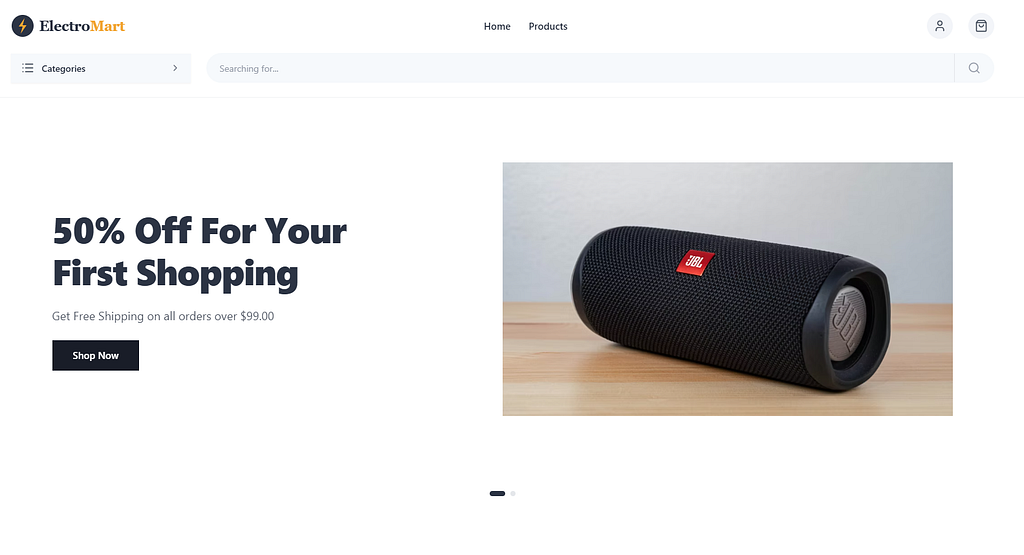
A honest account of building ElectroMart a production-ready electronics store with React, Node.js, MongoDB, Clerk, Cloudflare R2, and deployment on Vercel and Render.
I had an idea: build a real, production-ready e-commerce app from scratch. Not a tutorial clone. Not a copy-paste project. A real app with authentication, image uploads, an admin panel, a CI/CD pipeline, and a live deployment.
This is the story of how I built ElectroMart.
Live Demo: https://electromart-bay.vercel.app
GitHub: https://github.com/Akil-Dikshan/electromart
Why I Built This
I was tired of following tutorials that held my hand through every step and then left me unable to build anything on my own. I wanted to feel the real pain of building something the broken deployments, the CORS errors at midnight, the bugs that make no sense until suddenly they do.
So I challenged myself. One feature at a time. No shortcuts.
The Tech Stack
Before I dive in here’s what I used:
Frontend: React 18, Vite, Tailwind CSS, shadcn/ui, React Router v6, Clerk
Backend: Node.js, Express, MongoDB, Mongoose, Clerk Express SDK, Multer
Infrastructure: Vercel (frontend), Render (backend), MongoDB Atlas, Cloudflare R2, GitHub Actions
Setting Up The Foundation
Setting up the foundation wasn’t about writing features. It was about building the scaffolding that everything else would sit on.
I set up:
- A GitHub repository with GitFlow branching-main, develop, and feature/* branches
- A Jira project with 7 epics and 42 tasks
- A GitHub Actions CI/CD pipeline that runs on every push
The CI/CD pipeline was something I had never set up before. Writing a YAML file that automatically runs checks on my code every time I push felt like actual professional development. Because it is.
Lesson: Professional developers don’t just write code. They build systems around their code.
Backend: Express + MongoDB
I focused on the backend next. I built:
- An Express server with security middleware (Helmet, CORS, Morgan)
- A MongoDB Atlas connection with Mongoose
- A Product model with a full schema
- A complete REST API -GET, POST, PUT, DELETE
- Seed data with 8 realistic products
The most important thing I learned here was the difference between a model and a controller. The model describes the shape of data. The controller decides what to do with it. Keeping them separate makes the code so much cleaner.
// Model — what the data looks like
const productSchema = new mongoose.Schema({
  name: { type: String, required: true },
  price: { type: Number, required: true },
  category: { type: String, enum: ['smartphones', 'laptops', 'tablets'] }
});// Controller — what to do with the data
export const getProducts = async (req, res) => {
const products = await Product.find({ isActive: true });
res.json({ success: true, products });
};Lesson: Separation of concerns isn’t just a buzzword. It makes debugging infinitely easier.
Building The React Frontend
The app started to feel real when I built the frontend:
- A React app with Vite
- React Router for navigation
- Product listing and detail pages
- API integration with the backend
The biggest aha moment here was understanding useEffect. It’s just a way to say “run this code after React has finished rendering.” The dependency array controls when it runs again. Once that clicked, async data fetching made complete sense.
useEffect(() => {
  const fetchProducts = async () => {
    const data = await getProducts();
    setProducts(data.products);
  };
  fetchProducts();
}, []); // Empty array = run once on mount
Lesson: React isn’t magic. It’s just JavaScript functions that return HTML.
The Cart System
Next I discovered one of the most important patterns in React: Context + useReducer.
The problem was simple: the cart needs to be accessible from the Navbar (cart count), the Product Detail page (add to cart), and the Cart page (view items). Passing props through every component would be a nightmare. That’s prop drilling.
Context solves this. It’s like a TV broadcast any component can tune in.
useReducer manages complex state changes in one place:
const cartReducer = (state, action) => {
  switch (action.type) {
    case 'ADD_ITEM':
      const exists = state.find(item => item._id === action.payload._id);
      if (exists) {
        return state.map(item =>
          item._id === action.payload._id
            ? { ...item, quantity: item.quantity + 1 }
            : item
        );
      }
      return [...state, { ...action.payload, quantity: 1 }];
    // other cases...
  }
};
Lesson: When state needs to be shared across many components, Context is your friend. When state logic gets complex, useReducer keeps it organized.
Authentication With Clerk
Building authentication from scratch JWT, bcrypt, sessions, refresh tokensis weeks of work and a security nightmare if done wrong.
Clerk handles all of it. I integrated it in one afternoon.
The most interesting part was building ProtectedRoute a component that wraps any route and redirects unauthenticated users:
function ProtectedRoute({ children }) {
const { isSignedIn, isLoaded } = useUser();if (!isLoaded) return <div>Loading...</div>;
if (!isSignedIn) return <Navigate to="/" replace />;return children;
}The isLoaded check is critical. Clerk takes a moment to initialize. Without it, users get redirected before Clerk even knows if they're signed in.
Lesson: Authentication is a solved problem. Use a service like Clerk and spend your time building features instead.
Cloudflare R2 + Admin Panel
The most technically challenging part was image uploads and the admin panel.
Cloudflare R2 is an object storage service compatible with AWS S3’s API. This means code written for S3 works on R2 with minimal changes and R2 is significantly cheaper.
The upload flow:
- User selects image in the Admin Panel
- Frontend sends it to POST /api/upload
- Multer processes the file in memory
- AWS SDK uploads it to R2
- R2 returns a public URL
- URL gets stored in MongoDB with the product
The tricky part was middleware ordering. My first attempt had protectRoute running before multer. This caused multer to never receive the file because the auth middleware was consuming the request body first.
// WRONG
router.post('/', protectRoute, upload.single('image'), uploadImage);// RIGHT — multer must process the file first
router.post('/', upload.single('image'), protectRoute, uploadImage);Lesson: Middleware order matters. A lot.
UI Polish + Deployment
Deployment humbled me.
I used Claude Code to polish the UI to match a professional e-commerce template. The result was a clean, modern storefront with a hero banner, product grid, and responsive design.
Then came deployment. Here’s what broke:
Problem 1: MongoDB Atlas rejected connections from Render because its IP wasn’t whitelisted. Fix: Allow 0.0.0.0/0 in Atlas Network Access.
Problem 2: dotenv.config() was called after the database connection was imported. The env vars were undefined when MongoDB tried to connect. Fix: Move dotenv to the very top.
// WRONG
import connectDB from './config/db.js'; // runs before dotenv!
import dotenv from 'dotenv';
dotenv.config();// RIGHT
import dotenv from 'dotenv';
dotenv.config(); // must be first!
import connectDB from './config/db.js';Problem 3: CORS was blocking requests from Vercel’s preview URLs. Fix: Allow all .vercel.app subdomains.
app.use(cors({
  origin: [
    'http://localhost:5173',
    'https://electromart-bay.vercel.app',
    /\.vercel\.app$/ // allow all Vercel preview URLs
  ],
  credentials: true
}));
Lesson: Deployment always breaks something. Budget time for debugging, not just deploying.
The Final Result
ElectroMart is now live with:
▹Product catalog with real product data
▹Shopping cart with persistent state
▹User authentication with email and Google
▹Protected routes
▹Admin panel with real image uploads
▹Full checkout flow
▹CI/CD pipeline
▹Live deployment
What I’d Do Differently
1. Add TypeScript from the start. JavaScript’s lack of types caused several bugs that TypeScript would have caught immediately.
2. Write tests. I didn’t write a single test. For a real production app this is a serious problem.
3. Plan the data model more carefully. I changed the Product schema several times during development. Better planning upfront would have saved time.
What’s Next
The app is far from finished. Next up:
- Stripe payment integration
- Order history and tracking
- Product reviews and ratings
- Email notifications
- Performance optimization
Final Thoughts
The best way to learn web development is to build something real. Not a tutorial. Not a clone. Something you designed, architected, and debugged yourself.
Every CORS error, every undefined variable, every broken deployment those are the moments where real learning happens. You can’t get that from watching videos.
If you’re learning to code, stop consuming and start building.
The code is on GitHub: https://github.com/Akil-Dikshan/electromart
I’d love to hear what you think drop a comment or connect with me on LinkedIn.
Thanks for reading.
~Akil Dikshan~